Step 1
You download the program jDownloader for your OS:
http://jdownloader.org/download/index
Step 2
You install jDownloader on your computer and then you start it.
Step 3
You log in your FTP server via a web browser using the button „Direct http access” in Client Area -> Services -> My services -> Product name -> View Details .
Step 4
You copy the address of the file you want to download.
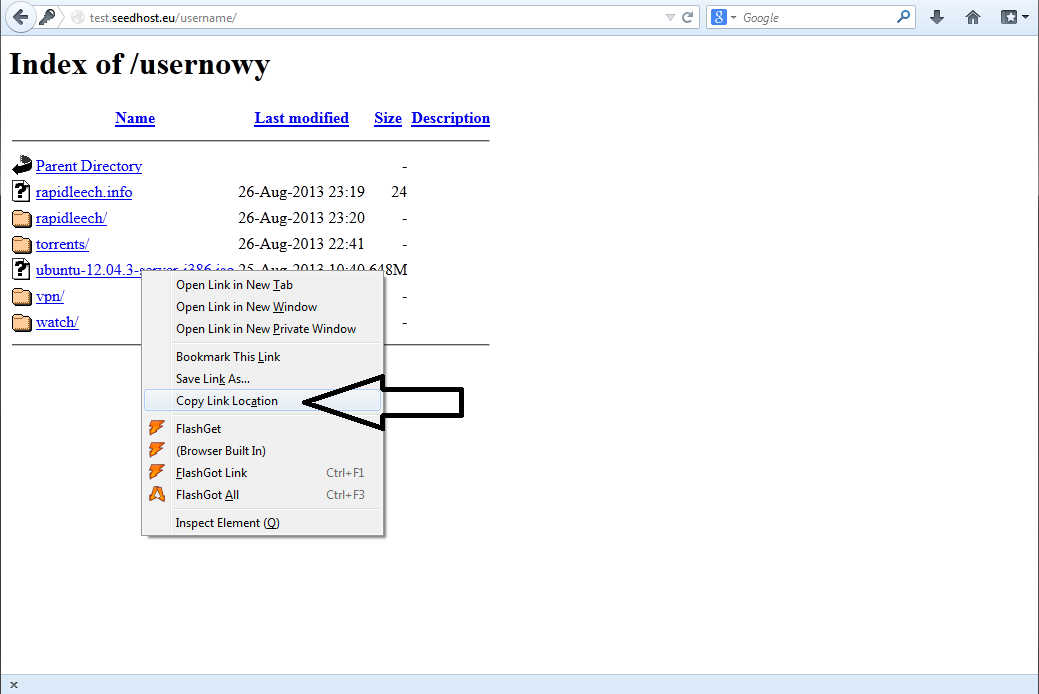
Step 5
You go to jDownloader’a, in the FileGrabber bookmark you click on Add URL and paste the address copied before in the following way:
http://test.seedhost.eu/userame/ubuntu-12.04.3-server-i386.iso
You need to add the following data "username:password@" between http://... and hostname so that the link in jDownloader will look like this:
http://username:password@test.seedhost.eu/userame/ubuntu-12.04.3-server-i386.iso
Where "username" and "password" it's your seedbox user and pass.
Step 6
In Filegrabber you click on Continue with all.
If everything was done properly, the files added before should start downloading automatically in the Download bookmark.