Step 1
Using the data from the Client Area you log in Deluge WebUI
Step 2
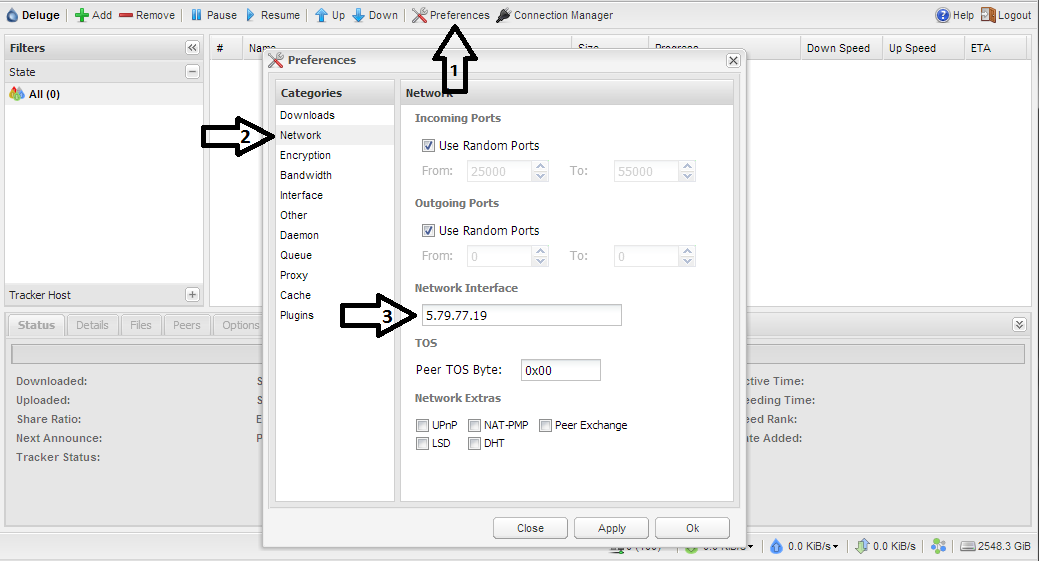
You go to Deluge Preferences, then you go to Network.
Your IP can be found in Network Interface (see the photo below)


Step 1
Using the data from the Client Area you log in Deluge WebUI
Step 2
You go to Deluge Preferences, then you go to Network.
Your IP can be found in Network Interface (see the photo below)
If your ISP throttles FTP traffic HTTP downloads may be the fastest method to get the data from...
Step 1 You download the program jDownloader for your OS:http://jdownloader.org/download/index...
How to configure the XBMC program to watch films and listen to music from FTPStep 1You download...
Step 1You download the latest CuteFTP version from:http://www.cuteftp.com/trial.aspx Step 2You...
Step 1 You download the program FlashFXP from:http://www.flashfxp.com/download Step 2 You...